
Support for Quantum Cryptography (PQC)
File Encryption/Decryption Service
Cryptan is a next-generation file encryption and decryption service that supports
quantum resistant cryptography (PQC) in anticipation of future "Store Now, Decrypt Later" attack threats.
The patented technology protects confidentiality from the threats of the quantum computer age.
An account registration for the " 4Login " smartphone application is required to use this service.
PQC-compliant version is available.
Development Supporter System *220 yen per month (tax included)
New products and new features of various family SSO-Integrated Products in connection with 4Login are available at
You will be able to experience the cutting-edge technology before anyone else.
What is Cryptan?
Cryptan is a patented password-free file encryption and decryption service provided by Passlogy Co., Ltd.

No password required
No need to set or share ZIP passwords. This reduces the time and effort required for transmission, and also minimizes the risk of password leaks.
Only the designated party can decrypt
Only the person designated as the recipient can decrypt the file. The file cannot be opened only by the person who has the file.
For your own backup
You can use it not only for sending files to others, but also for storing important files for your own personal use and for encrypted backup.
PQC (Quantum Quantum Cryptography) support
In addition to the ease of use with no password required, it can also be used for important file storage that supports PQC (quantum cryptography resistant).
Development Supporter Functions
How to Use
Cryptan uses the " 4Login authentication smartphone application to create a secure state in which "only the designated party can decrypt".
01: Application Preparation
Install " 4Login " on your smartphone.
02: File encryption
Select a file on Cryptan Web and encrypt/decrypt it. Use the " 4Login " authentication function.
03: Secure storage and sharing
Keep the file as a backup for yourself n/a no one else can see it, or send the file only to the person you specify.
How to encrypt files
Specify the recipient's e-mail address and drag & drop the file to create an encrypted file.
Simply send the created encrypted file to the recipient by any means! No password setting is required!
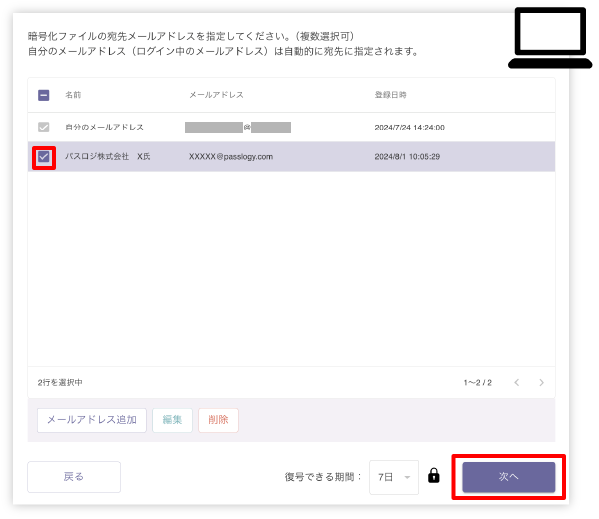
STEP1
Specify the recipient's e-mail address.
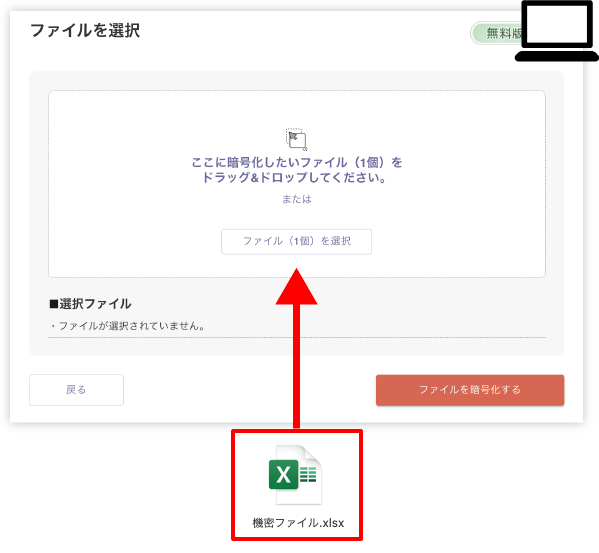
STEP2
Drag and drop the file.
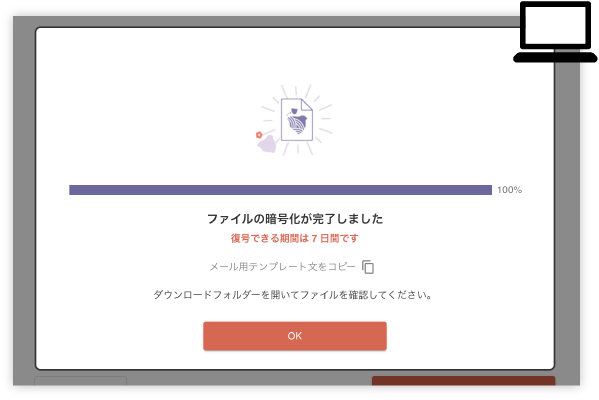
STEP3
An encrypted file will be created!
Cryptan Web: 4 unique architectures
1.[Dynamic Key Control] Intelligent key management according to your usage.
The system automatically determines whether the recipient is "yourself" or a "third party/group" and applies the most appropriate logic.
- Personal (backup): Personal public key in the 4Login App seals the DEK, providing strong device-complete protection.
- Sharing with others: Dynamically switches to the server key method, providing advanced access control that allows only specified groups or parties to securely decrypt.
2.[Zero-Knowledge Isolation] Thorough management to keep private keys n/a
Personal private keys are generated and stored in the " 4Login App" secure area in the user's smartphone. Since the private key is never taken out of the device in plain text, and is managed in encrypted form during backup, it is impossible for even the service operator to "know" the contents of the user's data.
Flexible Hybrid Design] Robust enough to adapt to future changes in standards. 4.
The "encryption of the file itself (AES-256)" and the "layer protecting the key (DEK)" are completely separated. This structure prevents cipher obsolescence and allows only the key protection layer to be replaced with the latest quantum-resistant standard (ML-KEM) while maintaining existing performance.
4. [Identity authentication type sharing] Transition from "I know" to "I am".
Eliminates the vulnerable process of "teaching" passwords to each other. Integrates the complex process of public key cryptography with 4Login authentication for a simple "just pick a destination" UX. Instead of a specification that anyone who knows the password can open it, it provides strict access control that allows decryption only when the designated "device of the person" is available.
Notices
- Important] Revision of Cryptan Desktop Terms of Service
- Important] Notice of Revision of Terms of Use for Cryptan Web
- Cryptan Software Ver. 1.8.1.1 is now available.
*Account registration with the " 4Login " smartphone application is required to use this service.
*Participation in the "Development Supporter" is required to use some functions.